Showing posts with label Organizing the Office. Show all posts

A Tangle-Free Solution for Organizing Cords

Bobino Cord Wraps
Are you tired of your cords always getting tangled? These Bobino Cord Wraps are a wonderful, simple solution. I use them all the time and I love how they make my life easier. They're perfect for keeping all electronic cords and cables organized and tangle-free. They come in three different sizes; small, medium, and large and can be purchased at ContainerStore.com. I use the small size for my cell phone and iPod earbuds, the medium size for my cell phone charger, and I use the large size for my laptop cords. I highly recommend giving them a try. They make great gifts, too.

-------------------------------------------------------------------------------  
Disclaimer: Everything mentioned here is used personally by Always Organizing and no payment is received to promote. I'm just happy to share products, services, and resources that I know work well for simplifying life. Enjoy!


A Simple Way to Backup Your Computer

In need of a really simple way to backup your computer? Use a large capacity USB flash drive (4 GB, 8 GB, or 16 GB). It's so easy anyone can do it! Need even more storage? Buy 2 or 3 and use one for data files, one for music files, and one for your digital photos. You'll never have to worry about losing valuable information again. Backup your computer files regularly (once a day, once a week, and every time you work on a big project) and designate a safe place to store it after each use. It's portable, very affordable, takes up very little space and it's a good idea to keep a second one in a location outside of your home in the event of a fire, flood, earthquake, or even theft. Peace of mind is priceless!

Take Charge of Desk Clutter

Are you tired of starting each day with a cluttered desk? A desk with piles of clutter is a huge distraction making it very difficult to get things done. It's time to take charge and to do something about it. Sweep everything into a box, do a quick sort, and only put back the essentials. Create homes for pens, important papers, To Do or Action items, office supplies, etc... everything needed to get you through the day. Make sure things you use frequently are within arms reach and all flat surfaces are clear with the exception of computer equipment and just a few other essential items. What to do with everything else? Get rid of it (recycle, shred, trash or donate) relocate it to another room if not office related, or (if office related) store it in your office further away from your desk (out of arms reach). Enjoy starting each day with a clear desk and a clear mind! How to keep it this way? Get in the habit of taking a few minutes at the end of each day to put things away.

Super Shredding Tips

To prevent identity theft, I highly recommend a shredder for every household and small business. What to shred? Credit card applications, canceled and voided checks, medical and legal papers (if no longer needed), expired charge cards, anything with an account or credit card number on it, and certainly anything containing your signature or social security number. You don't want any of your pertinent information landing in the wrong hands. So shred, shred, shred! Not sure whether or not to shred? Shred anyway... it's always better to be safe than sorry. (Exception to the rule: Birth/Marriage/Divorce/Death Certificates)

For a complete list of what to shred visit www.fightidentitytheft.com.

Want to shred, but don't want to have to store a big and bulky paper shredder in your home or office? After all, they're not the prettiest things to look at. Have you seen the smaller versions, yet? They now make them small enough to sit right on top of your desk, if you want. This M5 Mailmate Shredder by Staples is only 11" x 12" x 9" and has a 1.62 gallon bin for holding shredded paper, credit cards, and even CDs & DVDs. What I like best about this is that, due to it's small size, it can easily be stored anywhere that's convenient for shredding. "Convenient" is the keyword here! (you'll be more likely to do it).

Are you a shredder?

Organizing Cords and Cables

Are your cords and cables behind your desk in a tangled mess? There are all kinds of products on the market for organizing cords these days. However, if you're not up for going that route, try organizing your cords with simple twist ties (found in most boxes of trash bags that you get at the grocery store). Don't have any? Small black zip ties will work, too.

Start by turning off your computer, printer, fax machine, scanner, and anything else that's plugged in. Pull your desk away from the wall and unplug and dust off everything. Untangle all the cords and figure out what goes to what. Label the cords using post-its cut into small strips (folded over like flags) positioning them down near the plugs.To make the labels a little more durable, laminate them with tape and cut off the excess. Plug the cords back in to their power strip and bundle up the really long ones with twist or zip ties, cutting off the excess. Make sure to leave enough slack for things like your mouse that move a lot. Finishing touch, wrap all the cords together with twist or zip ties secured at several places along their length.

This method will keep your cords contained and out of the way and your desk/work area will look a lot neater. Plus, you'll easily be able to tell with a quick glance which cord goes with what device. A simple thing that makes a big difference!

Do you have a favorite way to organize your cords and cables? If so, I'd love to know!

Best Buy Recycles Electronics

Did you know Best Buy recycles old electronic equipment? Yes, it's true! It doesn't matter where you bought it, they'll recycle it. How cool is that? They recycle TVs, DVD and MP3 players, cell phones, CDs, audio and video cables, computers, monitors, home stereos, car audio, fans, vacuum cleaners, and more. It's absolutely FREE in most states (with a few restrictions) and they allow you to drop off 3 items per household, per day.

Restrictions:

  • They do not recycle hard drives. So if you're recycling a desktop or laptop computer, you must first remove the hard drive. You can do it yourself or they'll do it for you for a small fee of $9.99.
  • Some states charge a $10.00 fee for TVs and monitors, but they'll give you a $10.00 Best Buy gift card in exchange.
  • No microwaves or any items containing Freon (i.e. air conditioners, mini refrigerators)
So get out there and dispose of your electronics properly. Best Buy makes it easier than ever!

Do you know of any other places that recycle old electronics?

Managing 'To Do' Lists - An Alternative System for Getting Things Done

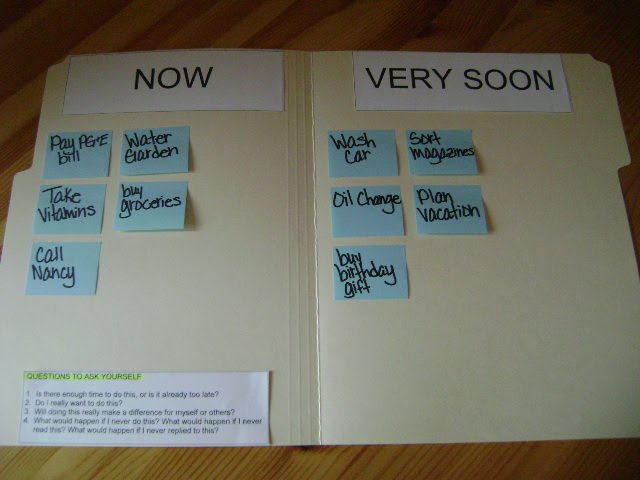
Are you an avid list maker, but still nothing ever seems to get done? In need of a new system for managing your To Dos? Sometimes creating lists on paper just isn't enough, especially if you're a visual and kinesthetic learner and struggling with managing your time. Check out this Panel System I recently created for a client. It's simple to use and easy to set up.

Directions

  • Divide the inside of a manila folder into two columns "Now" and "Very Soon".
  • Transfer all of the items on your To Do list(s) onto sticky notes (one per note).
  • Place the sticky in the "Now" column if it needs to be done right away or place it in the "Very Soon" column if it can wait a couple days. Optional: A third column can be added for things that need to get done "Later".
  • As you complete a task in the "Now" column, take the sticky off. Then move an item from the "Very Soon" column to the "Now" column.
  • Display the Panel System on the wall or tack it to a bulletin board.

What's really great about this system is that it's visual and tactile, tasks can be placed in order of importance (for easy prioritizing), items can easily be moved from one column to the next, and the number of items is limited by the size of the panel (making tasks more achievable and less overwhelming).
Also, this is great for those who can't seem to get away from using sticky notes (like myself!)

Before adding new items always ask yourself
  • Is there enough time to do this, or is it already too late?
  • Do I really want/need to do this?
  • What would happen if I didn't do it?
To keep on top of your To Dos, only add a new task if it's something that's really important to you and, therefore,
worth doing.

How do you manage your To Dos? (I would love to know!)

5 Steps to Organizing a Desk Drawer

1. Take everything out of the drawer and sort by grouping similar items together (i.e. post-its, binder clips, rubber bands, etc.). Toss all trash and put things that go in other rooms aside for now.

2. Decide
which items will be going back into the drawer. I recommend keeping only items in the drawer that you use most often and relocate the rest.

3. Measure the drawer (Length, Width, Height).

4. Purchase drawer organizers (if you don't have some already). I recommend Good Grips Interlocking Bins by OXO. They're clear, lock together, and come in a variety of sizes for a custom fit.

5. Install the
drawer organizers and put items back into the drawer. The drawer organizers will keep everything in its place. Aaaah...Much better!

Stop Unwanted Mail - Fantastic Resource!

Does your mailbox look like this? According to CatalogChoice.org, "on average, we get 900 pieces of unsolicited mail per yer." Unbelievable! Interested in reducing that amount? Think of all the time and trees you'll save! I'm happy to announce that CatalogChoice.org is not just for catalogs anymore. They're now a resource for stopping all kinds of junkmail, such as credit card offers, coupons, letter size direct mail, other unsolicited marketing offers, and even phonebooks. How cool is that? To get started go to www.CatalogChoice.org and set up an account. It's fast, simple to use, and it's free!

Organizing Shopping/ATM Receipts

Looking for a fast and easy way to organize shopping and ATM receipts while on the go? Take a standard white envelope and cut off the flap. Place the envelope in your purse. After making a purchase always ask to be handed the receipt (never leave it in the bag!). Immediately slip the receipt into the envelope in your purse (writing notes on the receipt as needed). If feeling rushed at the check out counter, take the receipt in hand and slip it in the envelope first chance you get (even if it's in your car). Use the envelope for ATM receipts, as well.

Get in the habit of doing this and it'll make your life so much easier... no more frantically looking for a receipt you need. You'll know right where to look. Regularly reconcile your receipts with your bank and credit card statements. Toss all receipts with the exception of those needed for tax purposes, big purchase items, and items you may return at a later date. If you prefer something a little sturdier and nicer to look at, try using a small (one-pocket) wallet like the one shown in the photo above.

Self-Adhesive Storage Bin Labels

Looking for a nice, stylish way to label your bins? These self-adhesive storage bin labels sold by Simplify101 are the way to go. They are sold in sets of 5 and each set includes self-adhesive vinyl pockets and label inserts. You can use your printer for the labels or hand write them yourself (A Microsoft Word template is provided). They come in a couple different sizes (3" x 5" and 1 1/2" x 3 1/2") to suit your needs.

How Long to Keep Financial Documents?

Are you wondering how long you need to keep financial documents? Check out these helpful guidelines provided by Suze Orman (America's expert on personal finance), "Financial Clutter, What to Keep and What to Get Rid of." Keep in mind, you can be audited by the IRS for no reason at all up to three years after you filed a tax return or two years from the date the tax was paid - whichever is later. If you omit 25% of your gross income you can be audited up to six years. Therefore, to be on the safe side, it's recommended to keep all financial documents relating to taxes for at least seven years. For more information visit www.irs.gov.